Quick Summary
This is the complete User Manual for Cinch StreamGrab. It will guide you through how to use the software to download video and audio from over 1,000 websites.
Cinch StreamGrab is a desktop application for downloading videos and audio from popular streaming platforms. It provides a clean interface to manage downloads, convert media formats, and organize your downloaded content.
Key Features
- One-click downloads via browser extension or protocol links
- Download queue with progress tracking
- Multiple format presets (MP4, MKV, WEBM, MP3, etc.)
- Media format conversion (remux)
- Proxy support
- Cookie-based authentication for restricted content
- Auto-update for both app and download core
Getting Started
Installation
- Download the installer from the official website
- Run
CinchStreamGrabSetup1.0.5.exe - Follow the installation wizard
- Launch StreamGrab from the Start Menu or desktop shortcut
First Launch
On first launch, you’ll see a welcome screen with:
- Connection Status – Shows whether the download core is connected
- Extension Setup – Instructions to install the browser extension
- Protocol Link – A fallback method to send URLs to StreamGrab
Download Center
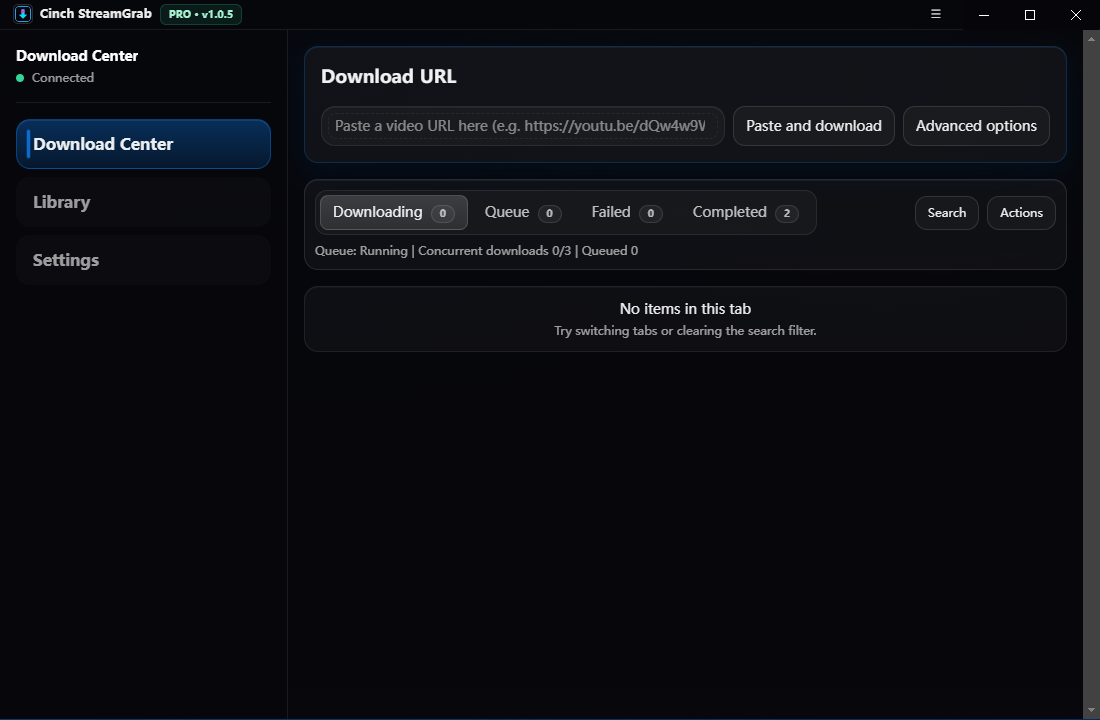
The Download Center is the main screen where you start and manage downloads.
Starting a Download
- Paste URL – Paste a video URL into the input field (e.g.,
https://www.youtube.com/watch?v=...) - Click Download – Click the “Download” button to start with recommended settings
Quick Presets
Click “Advanced options” to access quick presets:
| Preset | Description |
|---|---|
| Best | Best available quality (recommended) |
| MP4 | MP4 format (H.264), most compatible |
| 1080p MP4 | 1080p resolution MP4 (Pro) |
| 720p MP4 | 720p resolution MP4 (Pro) |
| Audio (M4A) | Audio-only M4A format (Pro) |
| MP3 | Audio-only MP3 format |
Task Tabs
| Tab | Description |
|---|---|
| Downloading | Active downloads with progress |
| Queue | Pending downloads waiting to start |
| Failed | Failed downloads with error details |
| Completed | Successfully completed downloads |
Task Actions
- Cancel – Stop an active download
- Retry – Retry a failed download
- Copy URL – Copy the source URL
- Show in folder – Open the download location
- Copy path – Copy the file path to clipboard
Bulk Actions (Pro)
Pro users can perform bulk actions:
- Pause/Resume queue
- Clear queue
- Retry all failed
- Clear completed/failed
Search & Filter
Use the search box to filter tasks:
status:failed– Show only failed taskssite:youtube– Show only YouTube downloads- Combine terms for advanced filtering
Library
The Library shows all completed downloads with search, filter, and batch tools.
Viewing Downloads
- Click any item to see details
- Double-click or click “Preview” to play the file
- Use the “…” menu for more actions
Search & Sort
| Filter | Options |
|---|---|
| Search | By title, URL, or file path |
| Site | Filter by source website |
| Sort | Downloaded time, file size, duration, site |
| Order | Ascending or descending |
Batch Selection
- Click “Select” to enter selection mode
- Click items to select (Shift for range, Ctrl+A for all)
- Use bulk actions:
- Copy file paths – Copy all selected paths
- Convert video – Batch convert to MP4/MKV/WEBM/etc.
- Convert audio – Batch convert to MP3/M4A/AAC/etc.
- Delete – Remove selected items and files
Media Conversion
Convert downloaded files to different formats:
- Video formats: MP4, MKV, WEBM, MOV, AVI, FLV, 3GP, WMV
- Audio formats: MP3, M4A, AAC, WAV, FLAC, OGG, AIFF, WMA
Converted files are saved to Downloads/StreamGrab/Converted/
Settings
Downloads
| Setting | Description |
|---|---|
| Download folder | Default save location for downloads |
| Preset | Default download format preset |
| Concurrent downloads | Number of simultaneous downloads (Safe/Balanced/Fast) |
| System notifications | When to show OS notifications |
| In-app completion message | Show toast when download completes |
| Playlist confirmation | Ask before downloading large playlists |
Sign-in / Cookies
For restricted content (age-gated videos, private playlists):
- Install Extension – Click to open extension installation guide
- Import cookies.txt – Manually import a cookies.txt file
- Auth Mode:
- Automatic – Auto-sync cookies from browser
- Disabled – Don’t use cookies
- Use cookies.txt file – Use a specific file
YouTube Client Selection
| Client | Use Case |
|---|---|
| Auto (recommended) | Automatically selects best client |
| Android | Use Android client |
| TV | Use TV client |
| Web | Use Web client |
| Web (Safari) | Use Safari Web client |
Network Proxy
Configure proxy settings:
| Mode | Description |
|---|---|
| Off | No proxy |
| System | Use system proxy settings |
| Custom | Enter custom proxy URL (e.g., http://127.0.0.1:7890) |
Advanced options:
- Auto-detect (Clash) – Automatically detect Clash proxy
- Refresh system proxy – Reload system proxy settings
Updates
| Setting | Description |
|---|---|
| Check for app updates on startup | Automatic app update check |
| Check for download core updates on startup | Automatic yt-dlp update check |
Manual actions:
- Check app updates – Check for StreamGrab updates
- Check download core version – Check yt-dlp version
- Update download core – Update yt-dlp to latest
License
Enter your license key to unlock Pro features:
- Enter your email address
- Enter your license key
- Click “Activate”
Pro benefits:
- Concurrent downloads (up to 5)
- All format presets
- Batch conversion tools
- Advanced format selector
Browser Extension
The StreamGrab browser extension allows one-click downloads from supported websites.
Installation
- Go to Settings → Sign-in / Cookies → Install extension
- Follow the installation instructions
- The extension folder is bundled with the app
Using the Extension
- Navigate to a video page in your browser
- Click the StreamGrab extension icon
- Click “Send to StreamGrab”
- StreamGrab will open and start the download
Protocol Link
If the extension isn’t available, use protocol links:
streamgrab://?url=https%3A%2F%2Fwww.youtube.com%2Fwatch%3Fv%3DVIDEO_ID&preset=best
Troubleshooting
Connection Issues
- Status shows “Offline” – Ensure StreamGrab is running
- Open status page – Check internal status at
http://127.0.0.1:17385/status
Download Failures
Common causes and solutions:
| Error | Solution |
|---|---|
| Sign-in required | Sync cookies via extension or import cookies.txt |
| Update downloader | Update yt-dlp in Settings → Updates |
| Proxy blocked | Disable proxy or use a different one |
| Private/restricted | Import cookies and retry |
Diagnostics
- Copy diagnostics – Copy error details for support
- Open logs folder – View
dev-main.logfor detailed logs
Free vs Pro
| Feature | Free | Pro |
|---|---|---|
| Daily downloads | 20/day | Unlimited |
| Concurrent downloads | 1 | Up to 5 |
| Format presets | Basic | All formats |
| Video formats | MP4 | MP4, MKV, WEBM, MOV, AVI, FLV, 3GP, WMV |
| Audio formats | MP3 | MP3, M4A, AAC, WAV, FLAC, OGG, AIFF, WMA |
| Batch actions | No | Yes |
| Batch conversion | No | Yes |
| Format selector | No | Yes |