Quick Summary
Explore how to get Traxsource to MP3! This guide covers official downloads and "free" recording alternatives for your Traxsource music. Get started!
Here’s the reality most “Traxsource to MP3” guides won’t tell you: buying every track at $2.99 apiece is the “correct” answer, but not the practical answer for working DJs.
When you’re testing 50-100 tracks for an upcoming set, that’s $150-300 just to figure out which 10 songs actually work in your mix. By the time you’ve previewed everything in your cart, the tracks you wanted might be sold out or removed. This is why thousands of DJs use automated recording tools—they capture the full-quality preview playback directly from Traxsource’s player, automatically split tracks, and tag everything while you’re doing something else.
What’s Your Actual Situation?
Pick your scenario below to jump straight to the solution that fits:
- You want to test tracks before committing money. The automated recording method below is built for this.
- You already bought the track but lost the file. Check the “Already Purchased?” section—your download might still be accessible.
- You own AIFF/WAV and need smaller files for USB. Use local conversion tools like VLC or FFmpeg.
- Your download link expired (21-day window). Recording is often faster than waiting for support to reactivate your access.
The Official Route: Purchasing and Downloading Directly from Traxsource
Purchasing music directly from Traxsource is the most straightforward and legitimate method to build your high-quality digital music collection, including Traxsource to WAV or MP3, while ensuring artists and labels are compensated for their work. This is the primary official Traxsource downloader method.
Buying from Traxsource: Supporting Artists, Guaranteed Quality
Opting to buy your tracks directly from Traxsource is more than just a transaction; it’s an investment in the electronic music ecosystem. This official method is the recommended path, guaranteeing you receive pristine audio files straight from the source and, crucially, ensuring that the artists and labels behind the music you love receive their rightful earnings. It’s the ethical choice that supports the continued creation of innovative electronic music.
Step-by-Step: Acquiring Tracks from Traxsource.com
Getting your hands on official downloads from Traxsource is a simple process:
Step 1: Account Setup: First, you’ll need to create an account if you don’t already have one. Head over to the Traxsource website and look for the “Sign Up” option. The process is quick and requires basic information.
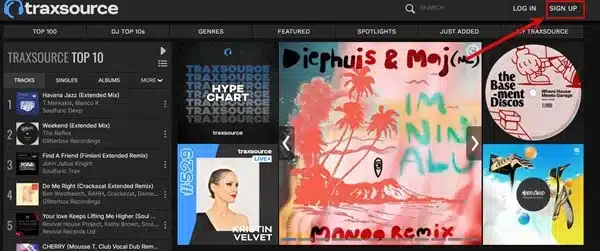
Step 2: Discover & Purchase: Once logged in, immerse yourself in their extensive catalog. You can navigate through genres, explore curated charts, check out new releases, or search for specific artists and tracks. When you find something you like, add it to your cart. Traxsource typically prices individual MP3s in the range of $1.99 to $2.99. Proceed to checkout, where you can pay using various secure methods like credit card or PayPal.
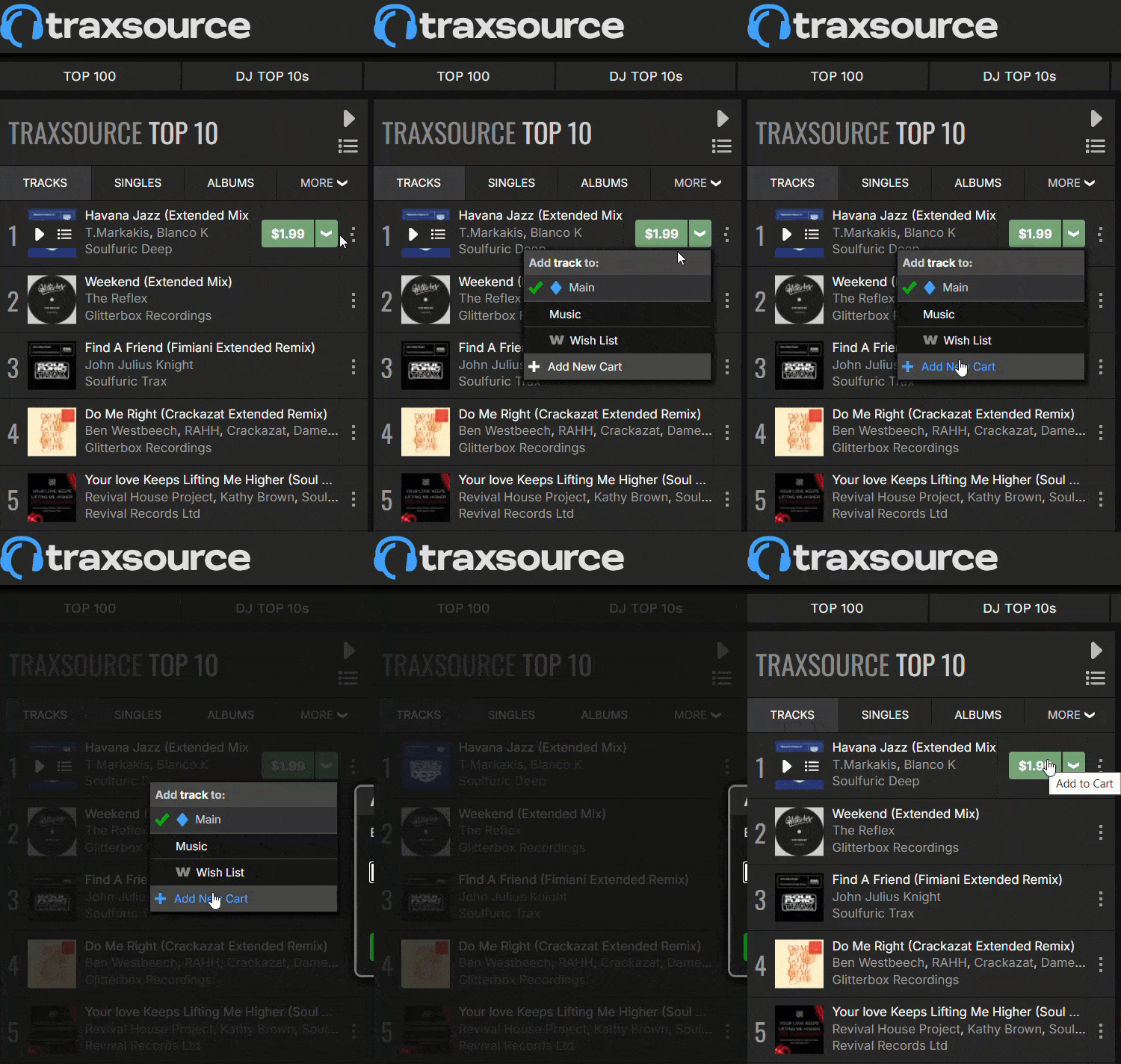

Step 3: Downloading Your Music: After your purchase is complete, navigate to your “My Downloads” page (usually accessible from your account dashboard). Here, you’ll see a list of your purchased tracks. You can then choose your preferred download format – MP3 (often available up to 320kbps), or lossless WAV or AIFF for the highest audio fidelity – and download them directly to your computer.
Using the Traxsource Download Manager (v2.0) – An Official Helper
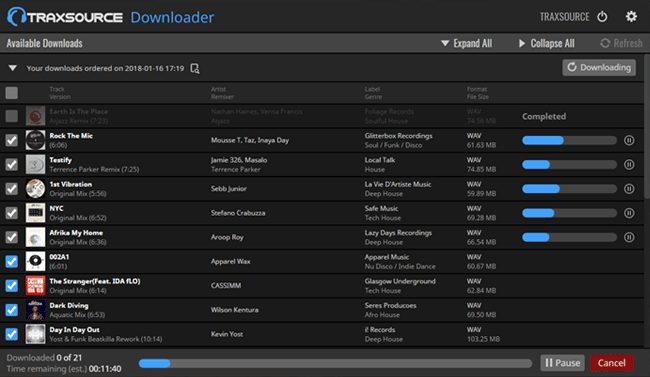
For users who purchase music regularly or in larger quantities, Traxsource offers the Traxsource Download Manager, a dedicated desktop application available for both Mac and PC. This tool, no longer reliant on Adobe Air technology, is designed to streamline the download process.
Key features include one-click downloads for entire orders, the ability to set a default download location, options for custom folder structures based on artist, label, or genre, and custom file naming conventions.
It also supports batch downloads, allowing you to grab up to five tracks simultaneously. While generally efficient, some users have reported occasional glitches with the Download Manager v2.0, which may require submitting error logs to Traxsource support for resolution.
Syncing with Dropbox: Your Traxsource Music in the Cloud
Traxsource also offers a convenient way to back up your purchased music and access it across multiple devices: integration with Dropbox. This is particularly useful for DJs and music lovers who want their library accessible wherever they go.
How to Link Traxsource to Your Dropbox Account
Linking your accounts is typically a one-time process initiated from your Traxsource account settings or downloads page. You’ll be prompted to authorize Traxsource to access a dedicated folder within your Dropbox.
Downloading Tracks Directly to Dropbox (Desktop/Mobile)
Once linked, you can often choose to send your purchased tracks directly to your Dropbox folder. This means your music is automatically saved to the cloud, accessible from any device where you have Dropbox installed, including your computer, tablet, or mobile phone. It simplifies backup and ensures you have your tracks even if your local hard drive fails.
Pros of the Official Method for Traxsource Downloads
Choosing the official route for your Traxsource downloads comes with significant advantages:
- Legality and Artist Support: It’s the 100% legal way to acquire music, directly contributing to the livelihood of the artists and labels who create the electronic music you enjoy.
- Audio Fidelity: You are guaranteed the highest available quality, whether it’s a high-bitrate MP3 or a lossless WAV/AIFF file, directly from the master source. This is crucial if you want pristine Traxsource to WAV files.
- Accurate Metadata: Purchased tracks generally come with complete and accurate ID3 tags, including artist, title, album, release, genre, and often DJ-friendly information like key and BPM.
- Customer Support: If you encounter any issues with your downloads, you have access to official Traxsource customer support for assistance.
Cons & Limitations of Official Traxsource Downloads
Despite the benefits, there are a few limitations to consider with official Traxsource downloads:
- Cost: Each track is individually priced, which can add up if you’re building a large library.
- Download Link Expiry: This is a crucial point often highlighted by users. Official download links provided by Traxsource typically expire after 7 days from purchase. While re-downloads are often possible within this window, or by contacting Traxsource support to refresh links, it’s a significant inconvenience and a major user pain point.
- Geo-Restrictions: Due to music licensing agreements, some tracks may not be available for purchase or download in certain countries or regions.
- No Refunds: Generally, all digital music purchases are final, so previewing tracks before buying is important.
Now, for those exploring other avenues to get Traxsource music onto their devices, let’s look at third-party recording tools.
The DJ’s Secret: Automated Preview Recording
This is where smart DJs save hundreds of dollars per month. Instead of blind-buying tracks or spending hours manually recording and tagging, you let software do the heavy lifting.
Why DJs Use This Method
Traxsource’s preview player streams high-quality audio directly to your browser. That audio is real—it’s not a compressed, watermarked demo. Recording it gives you a usable file for:
- Set preparation: Test how tracks blend together before you commit your budget.
- Backup copies: When your 21-day download window expires and support is slow to respond.
- Quick access: No more digging through email receipts or fighting with the Downloader app.
Free Method: Manual Recording (If You Have Time)
You can use Audacity with WASAPI loopback (Windows) or BlackHole (Mac) to capture system audio. Here’s what that process looks like:
- Set up your virtual audio device.
- Hit record, play the 6-minute preview in full.
- Export as 320kbps MP3.
- Manually type in the artist name, track title, BPM, and genre for every single track.
This works. But if you’re recording 20+ tracks, that’s 2+ hours of babysitting a recording session plus another hour of manual tagging. Your time is worth more than that.
How to Record Traxsource to MP3: Exploring “Free” Alternatives with Third-Party Traxsource Downloaders
While purchasing music directly is the ideal way to support artists, many users search for “free” ways to get Traxsource tracks as MP3s for personal offline use. This typically involves using third-party audio recording software, often referred to as a Traxsource downloader by users.
How Audio Recording Software Works with Traxsource
The concept behind these tools is straightforward: they act like a high-tech tape recorder for your computer. When you play music on Traxsource (or any other streaming service), the software “listens” to the sound being outputted by your computer’s sound card (system audio) or directly from the web browser. It then encodes this captured audio into a digital file, commonly an MP3 or WAV. The quality of the recording can depend on several factors, including the capabilities of the recording software itself, your computer’s system resources, the stability of your internet connection during playback, and the quality of the stream being played on Traxsource.
Our Top Recommended Traxsource Downloader Software: Cinch Audio Recorder
For users looking for a reliable and feature-rich tool to record Traxsource streams and effectively act as a Traxsource to MP3 converter, our top recommendation is Cinch Audio Recorder. It’s designed to capture streaming audio with ease and high quality, making it a strong candidate for saving your favorite Traxsource sessions as MP3s.
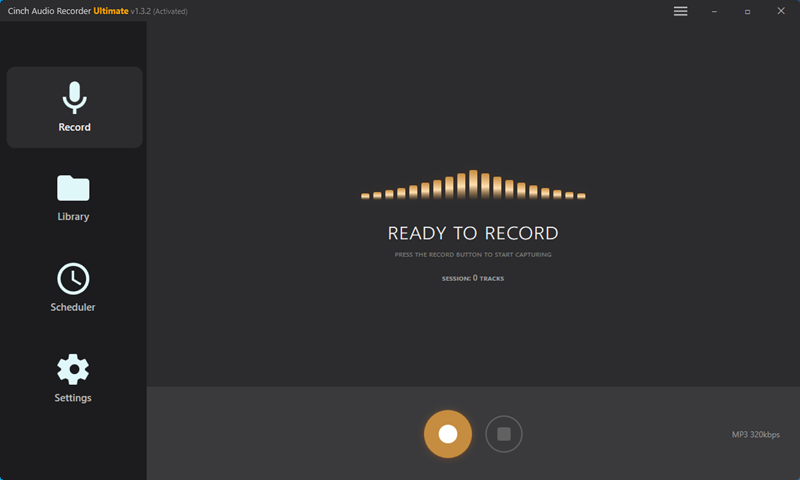
Step-by-Step Guide: Recording Traxsource Music to MP3 with Cinch Audio Recorder
Here’s how you can use Cinch Audio Recorder, a leading Traxsource downloader for recording, to capture your favorite Traxsource tunes:
Step 1: Download and Install Cinch Audio Recorder
First, head over to the official Cinch Audio Recorder website to download the installer. Follow the on-screen instructions to install it on your Windows or macOS computer.
Step 2: Initial Setup & Configuration (One-Time)
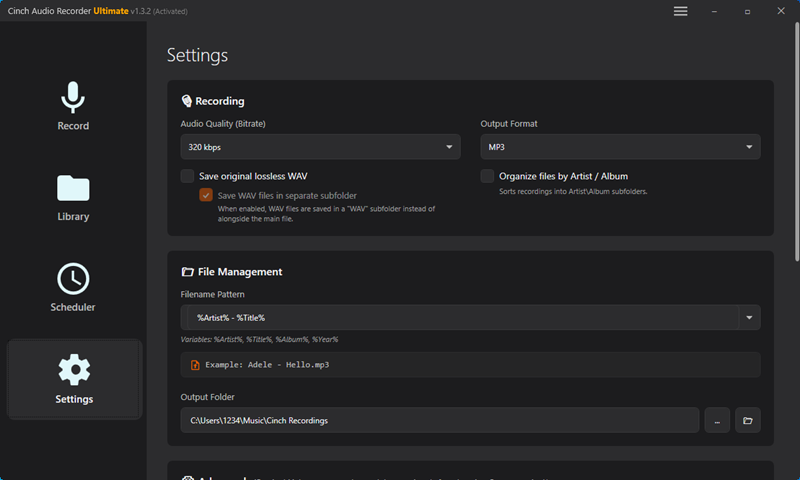
Launch Cinch Audio Recorder. Before your first recording, it’s a good idea to check the settings. Look for options to:
- Select your desired output format (e.g., MP3 for broad compatibility, or WAV for lossless quality if you want Traxsource to WAV).
- Choose the audio quality or bitrate (for MP3, 320kbps is recommended for high quality).
These settings are usually found in a “Settings,” “Preferences,” or “Options” menu.
Step 3: Prepare for Recording
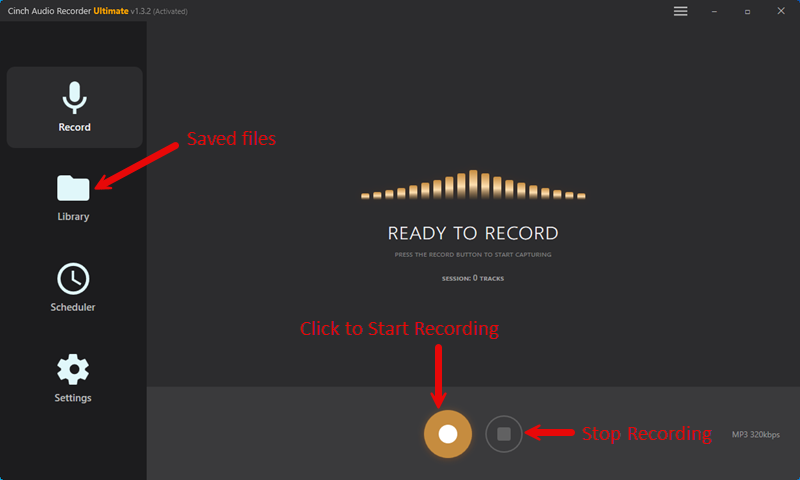
Open your preferred web browser and navigate to the Traxsource website. Find the specific track, DJ mix, or live stream you wish to record. Get it cued up but don’t press play just yet. Now, switch back to Cinch Audio Recorder and click the main “Record” button (it’s often a large, prominent icon). Crucially, ensure Cinch is in recording mode before you start playing the audio on Traxsource.
Step 4: Play the Traxsource Track & Record
With Cinch actively recording, go back to your browser and play the selected track on Traxsource from the beginning. Cinch will automatically detect and capture the audio. For the best results, avoid playing any other sounds or videos on your computer during the recording process, and ensure you have a stable internet connection to prevent buffering in the Traxsource stream.
Step 5: Stop Recording & Save
Once the song or audio segment has finished playing completely, switch back to Cinch Audio Recorder and click the “Stop” button. The software will then process the recording. If its automatic ID3 tagging is successful, it will populate the track information (title, artist, album, artwork). The file will be saved in your designated output folder. You can then usually access a list of your recordings within Cinch, where you might find options to use the built-in ID3 editor for any tweaks or the ringtone maker.
Step 6: Enjoy Your Traxsource MP3!
Navigate to the output folder you specified in Step 2. Your newly recorded Traxsource track should be there as an MP3 (or your chosen format), ready for offline listening, adding to your DJ software, or any other personal use.
User Tip/Best Practice: For the cleanest recording, ensure a stable internet connection throughout the playback and close any unnecessary applications that might generate notification sounds or heavily consume system resources, which could potentially interfere with the audio capture.
Head-to-Head: Official Traxsource Downloads vs. Third-Party Recorders
Choosing how to get your Traxsource music involves weighing several factors. Let’s compare the official purchasing route against using third-party audio recorders like Cinch Audio Recorder, which many consider a type of Traxsource downloader for recording streams.
Comparison Table: Choosing Your Method to Convert Traxsource Music
This table breaks down the key differences to help you decide:
| Feature | Official Traxsource Purchase | Third-Party Recorders (e.g., Cinch Audio Recorder) |
|---|---|---|
| Legality & Ethics | Fully Legal, Directly Supports Artists & Labels | Grey Area (Personal use often tolerated; check ToS). No direct artist payment from recording. |
| Cost | Pay-per-track (e.g., ~$1.99-$2.99 per MP3) | Software purchase (e.g., Cinch often a one-time fee, ~$25) or Free (for some tools with limitations/ads). |
| Audio Quality | Guaranteed highest (original source: WAV/AIFF/320kbps MP3) | Variable: depends on recorder, system, source stream. Cinch aims for lossless/320kbps from sound card. |
| Ease of Use | Simple download process from “My Downloads” or Download Manager | Recorders vary; Cinch is designed to be user-friendly (often 1-click). |
| Metadata (ID3 Tags) | Generally accurate and complete from the source. | Auto-tagging (e.g., by Cinch) is usually good but may occasionally require manual edits. |
| File Format | MP3 (up to 320kbps), WAV, AIFF | Typically MP3, WAV; some tools offer more format options. |
| Download Expiry | Yes (links typically expire after 7 days) | N/A (recorded files are permanent on your local drive). |
| Source of File | Original master file from Traxsource. | A recording of the audio played on your computer. |
| Special Features | Access to official DJ tools, charts, verified track info. | Record any streaming audio, ad filtering (some tools), ringtone maker (e.g., Cinch). |
Which Method is Right for You?
Ultimately, the best method depends on your priorities and how you intend to use the music:
- Choose Official Purchase if: You are a professional DJ who needs guaranteed pristine audio quality and accurate metadata, you want to directly and ethically support the artists and labels, and you don’t mind the per-track cost. This is the highly recommended route for professional and ethical use.
- Consider Third-Party Recorders (like Cinch Audio Recorder) if: You are a casual listener wanting offline personal copies of tracks you have legitimate access to stream, you understand it’s a recording of the stream rather than a direct download of the source file, you are looking for a more budget-friendly way to build a personal offline library (after software cost), or you face geo-restrictions on purchasing certain tracks. Always use such tools responsibly and be mindful of copyright.
FAQs
Will recorded MP3s sound as good as purchased Traxsource MP3s or WAVs?
Purchased tracks (WAV, AIFF, 320kbps MP3) come from master versions. Recorders capture audio as played, aiming for high fidelity but influenced by system setup. Official purchases ensure the best quality.
Are third-party Traxsource downloaders safe?
Only download software from official sources (e.g., cinchsolution.com). Avoid third-party sites, torrents, or forums, as they may contain malware.
Can I record live DJ sets or radio shows streamed on Traxsource?
Yes, tools like Cinch Audio Recorder can capture any system audio, including live streams, for personal offline listening.
What’s the best free Traxsource downloader or recorder?
Most reliable recorders are paid, with free trials. “Free” tools often have limitations or risks like malware. Audio recording (with a one-time software cost) is the safest method.
My Traxsource download link expired—what now?
Contact Traxsource Support with proof of purchase; they may refresh your links. Download purchases promptly to avoid expiration.
Conclusion
Ultimately, getting your Traxsource music as MP3s or even WAV files involves choosing between direct, high-quality official purchases that support artists, or using a capable Traxsource downloader like Cinch Audio Recorder to record streams for personal offline use. Each method to convert Traxsource music has clear benefits regarding audio quality, cost, and ethical considerations.
For those opting to record, we recommend Cinch Audio Recorder for its ease of use in capturing Traxsource audio and its robust features. Make the choice that best suits your needs, and enjoy building that amazing Traxsource collection for endless musical inspiration.