Quick Summary
Considering TuneFab Spotify Converter? Users report account bans after using it. Learn the real risks, pricing details, and safer alternatives before you decide
TuneFab Spotify Converter works for many users—but some have lost their Spotify accounts after using it. Multiple Trustpilot reviews document account suspensions following TuneFab updates.
This matters most if you have a long-term Premium account with curated playlists and algorithmic recommendations you can’t easily rebuild. The software requires logging into Spotify within the TuneFab application itself, which creates a detectable trail that Spotify’s Terms of Service explicitly prohibit.
Below, we’ll walk through what TuneFab does, what users actually experience, the suspension reports, pricing complications, and whether a recording-based alternative like Cinch might suit you better.
What TuneFab Spotify Converter Actually Does
TuneFab Spotify Converter is a desktop application (Windows and Mac only) that downloads music from Spotify and converts it to standard audio formats. According to TuneFab’s official specifications, it supports:
- Output formats: MP3, FLAC, WAV, M4A, ALAC, AIFF
- Conversion speed: Up to 35X (claimed, v3.1.19 and later)
- Audio quality: Up to 320kbps MP3; lossless options available
- Metadata: Preserves ID3 tags, album art, and track information
- Free trial: 3 full songs before purchase
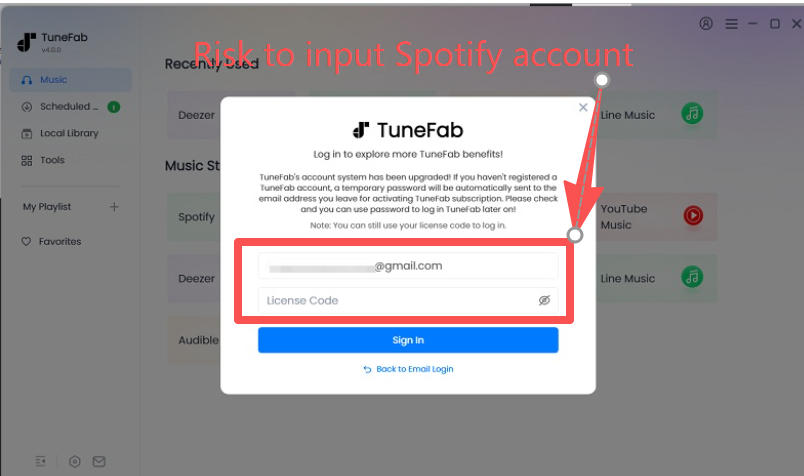
To use TuneFab, you must log into Spotify’s web player within the TuneFab application. This isn’t optional—the software needs to authenticate with your Spotify account to access and download your music.
*That login requirement is where the risk begins.
The Account Safety Question Nobody Can Ignore
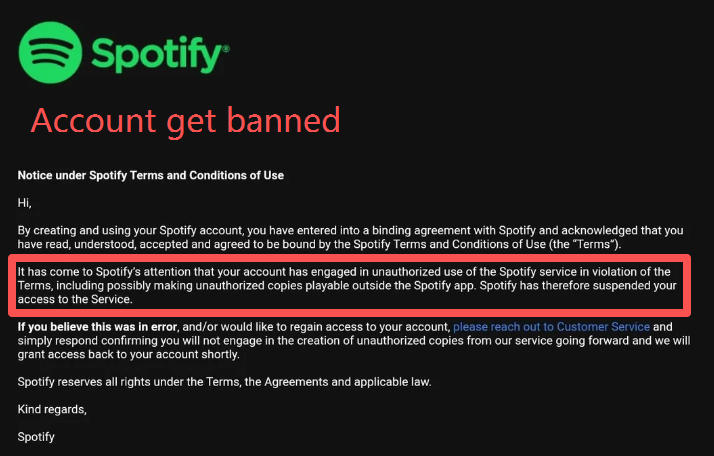
Multiple users report Spotify account suspensions after using TuneFab.
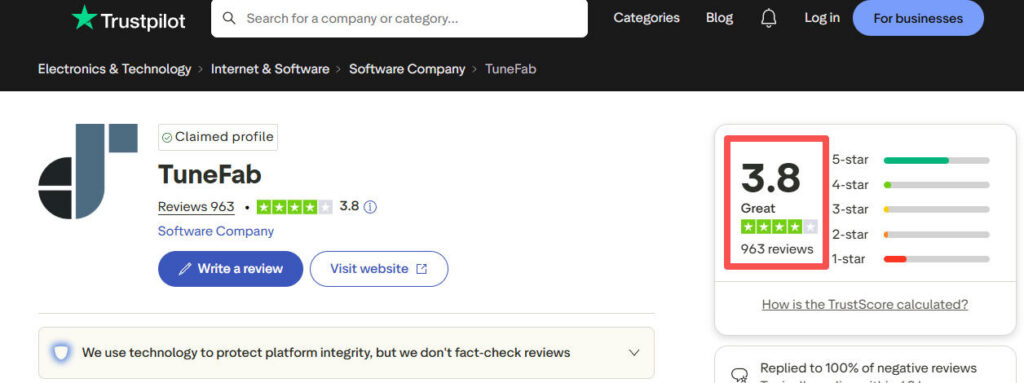
On Trustpilot, where TuneFab has 962 reviews averaging 3.8 stars, users describe similar scenarios:
“On February 2nd, 2026, after their update, my Spotify account was suspended for ToS violations directly caused by their software.” — Trustpilot review
Another user reported:
“My Spotify account got suspended. My inquiry to TuneFab has not been answered to date.” — Trustpilot review
Why This Happens
TuneFab requires you to log into Spotify within its application. This creates a detectable connection that Spotify’s systems can flag. Several users experienced suspensions after Spotify or TuneFab updates—suggesting detection methods evolve over time.
What we don’t know: the exact percentage of affected users, specific triggers, or how Spotify’s detection works internally. The risk cannot be eliminated.
For context: If you have a long-term Premium account with extensive playlist history and personalized recommendations, that risk may outweigh the convenience of downloading your music.
The Safer Alternative: Recording Instead of Downloading
If this risk already sounds unacceptable, stop comparing downloaders and switch categories. Cinch Audio Recorder Ultimate takes the safer route: it records the audio your computer is already playing, so you are not handing Spotify credentials to a third-party downloader in the first place.
That trade-off is obvious. Recording is slower. But if your main goal is to keep your Spotify account out of the blast radius, slower is a pretty small price to pay.
Real User Experiences
TuneFab has a 3.8-star Trustpilot rating from 962 reviews—a mixed picture.
What Users Appreciate
Positive reviews consistently mention:
- It works for basic use: Most users successfully convert individual songs and small playlists
- Audio quality meets expectations: When conversion succeeds, output quality satisfies typical listeners
- Batch conversion saves time: For users who don’t encounter failures, batch processing works as advertised
“The software works as advertised. I’ve converted my entire playlist without issues.” — Trustpilot positive review
Where Users Run Into Problems
Large playlist conversions may fail. Third-party reviewers note:
“During the test of large playlists (100+ songs), some songs failed to convert.” — MusicFab review
Users with extensive libraries report conversions sometimes stall around 90% completion, requiring manual intervention. If you plan to convert large playlists, test with a smaller batch first during your trial.
Audio glitches appear in some conversions. A Trustpilot complaint describes:
“The software adds small glitches or ‘skips’ to every song. For me it is about 12-15 seconds in. They refuse to refund.” — Trustpilot negative review
This isn’t universal, but it’s reported often enough to warrant attention—especially if you’re an audiophile or plan to use converted files for DJing or other quality-sensitive purposes. Verify your converted files during the trial period before committing to a purchase.
Customer support is hit-or-miss. Some users receive quick responses; others report no reply after multiple attempts. One user with an account suspension issue documented:
“Contacted TuneFab support 3 times via email + Facebook; no response for 2 weeks. Refund received only after posting public complaints on Trustpilot, Sitejabber, and Facebook.” — Trustpilot review
The refund eventually came—but only after public escalation across multiple platforms.
The Android App Situation
If you’re hoping to convert music on your phone: TuneFab’s Android app is discontinued.
“Tunefab Spotify to MP3 for android mobile doesn’t work at all now. I bought a lifetime subscription for Google Pixel 7 mobile for about $30, and for a while it was excellent. Then about a year ago it just stopped working completely.” — Trustpilot review, March 2026
The company reportedly offered affected users desktop licenses as compensation—but if you don’t use a desktop computer, that’s not much help.
Current status: Windows and Mac versions only. Converted files can be transferred to mobile devices, but the conversion itself happens on desktop.
Pricing and Subscription Model
TuneFab offers three pricing tiers:
| Plan | Price | Notes |
|---|---|---|
| Monthly | $25.95 | Auto-renews; 5-day refund window |
| Yearly | $69.95 | Auto-renews; 5-day refund window |
| Lifetime | $89.90 | One-time payment; 14-day refund window |
The Hidden Complexity: Subscription Management
Subscriptions are handled through MyCommerce, a third-party payment processor—not directly through TuneFab. This adds friction because:
- Cancellation happens through the MyCommerce portal, not TuneFab’s app
- Some users report being charged even after receiving cancellation confirmations
- Refund requests may require persistence and documentation
One user’s experience:
“CANCELLED MONTHLY SUBSCRIPTION – GOT EMAIL CONFIRMATION – CREDIT CARD STILL CHARGED FOR ANOTHER MONTH – NO REPLY FROM ANYBODY AT SUPPORT AFTER 5 EMAILS” — Trustpilot review
This isn’t every user’s experience, but if you’re risk-averse about billing, understand that subscription management adds friction. Document everything: Save cancellation confirmations, check your statements, and follow up if charges continue.
Calculating Real Cost
Beyond the sticker price, factor in:
- Time cost: Troubleshooting failed conversions, retrying stalled downloads, contacting support
- Account risk cost: If suspended, you lose playlist history, followed artists, and algorithmic recommendations accumulated over years—this “cost” is harder to quantify but far more significant for long-term users
- Long-term pricing: Monthly subscriptions auto-renew; lifetime costs more upfront but may be cheaper over 12+ months
The “cheapest” option depends on your situation. A $25.95 monthly subscription that works without issues costs less than a $89.90 lifetime license that triggers account problems after three months.
Who Should Consider TuneFab
TuneFab may fit if you:
- Need bulk conversion speed more than peace of mind: You care most about getting a lot of tracks out quickly
- Work entirely on desktop: Your setup is already Windows or Mac, and you do not need mobile conversion
- Can live with account and support uncertainty: You are not expecting a risk-free purchase
Who Should Probably Avoid TuneFab
Do not use TuneFab if:
- Your Spotify account is valuable to you: If losing that account would be painful, this is the wrong category of tool
- You’re risk-averse about accounts: If losing access would be genuinely upsetting or disruptive, the convenience of batch downloads isn’t worth the anxiety
- You need mobile conversion: No current mobile solution exists from TuneFab
- You want guaranteed customer support: TuneFab’s support responsiveness varies unpredictably
Alternatives Worth Considering
Recording-Based Option: Cinch Audio Recorder Ultimate
This is the part most TuneFab reviews gloss over: a downloader and a recorder are not the same kind of product.
TuneFab sells speed. Cinch sells distance from account risk.
With Cinch, you play music normally and capture the system audio instead of pulling tracks through a downloader tied to your Spotify login. That means the workflow is slower, but it is also much easier to justify if your priority is staying out of account trouble. It also gives you a more flexible desktop audio tool overall: you can record streaming audio, auto-split tracks, pull metadata, grab lyrics, clean up short ad fragments, and test it free for 9 songs before deciding whether it fits your setup.
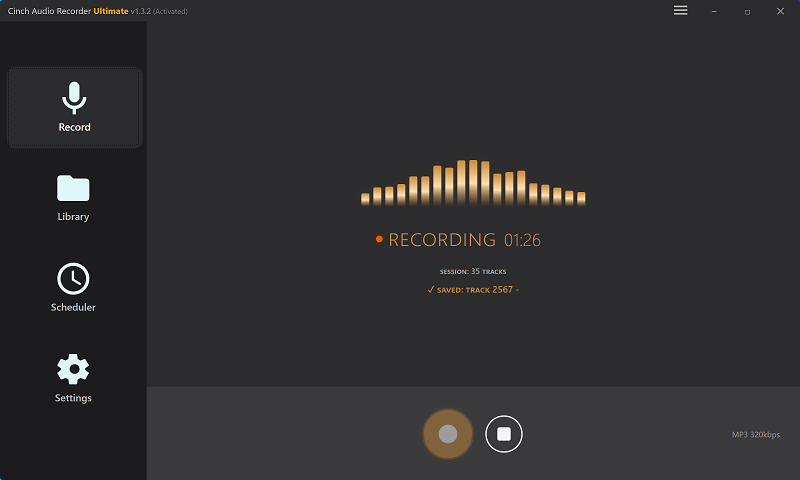
If that sounds closer to what you actually want, this is probably the point where you stop looking at TuneFab and try Cinch instead.
Quick Comparison: TuneFab vs. Cinch
| Tool | Better For | Main Trade-Off | Why You’d Pick It |
|---|---|---|---|
| TuneFab | Fast downloading | Still lives in the downloader bucket, so the same basic account-risk conversation never really goes away | Only if speed matters more to you than caution |
| Cinch Audio Recorder Ultimate | Safer everyday use | Real-time recording is slower than batch downloading | You want a simpler, lower-stress way to keep music without tying the workflow to a Spotify downloader |
That is the real fork in the road. If you are still shopping inside the downloader category, you are mostly comparing flavors of the same risk. If you want out of that risk profile, Cinch is the cleaner move.
What To Do Before You Spend Money
Start with the only question that matters: if TuneFab ever triggered an account problem, would you regret the decision more than you would appreciate the download speed?
If the answer is yes, do not waste time trying to engineer a “safe” way to use a downloader. That is the wrong fight. Download a trial of Cinch Audio Recorder Ultimate instead and see whether the recording workflow feels acceptable for your library.
Only keep TuneFab on your shortlist if fast batch exporting matters enough that you are willing to live with the account risk, the desktop-only limitation, and the uneven support reports.
Which Option Fits You
Here is the blunt version: if your Spotify account matters, skip TuneFab.
The software may work fine for people who mainly care about speed and are comfortable gambling on a third-party downloader. But that is not the reader this article is really for. If you came here because the idea of account suspension already makes you uneasy, you do not need more reassurance. You need a different tool class.
That is why Cinch Audio Recorder Ultimate is the stronger recommendation in this case. It is slower, but it solves the problem without asking you to hand your login to the very kind of app that keeps showing up in user complaints. Start with Cinch’s 9-song free trial. If the workflow feels good enough, you will probably never need TuneFab.